



Has your dental practice been exploring ways to take patient experience to the next level? Patient satisfaction is directly correlated with revenue, retention rate, and practice growth. So, if you haven’t already taken steps to provide the ultimate patient experience, now is the time to implement effective approaches.
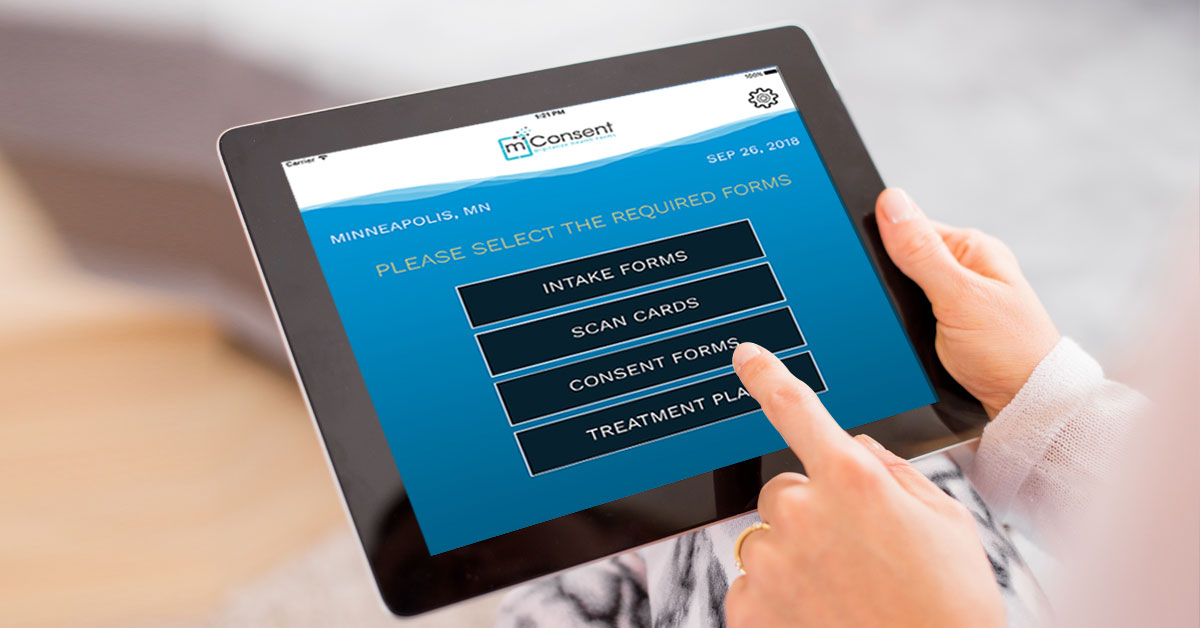 Digitization has become the answer to patients’ paperwork anxiety. How so? Dental software has advanced to the point of patients completing and e-signing intake forms in front of the TV, on their sofa.
And, on top of that, capturing their ID, insurance card, and photo, all to be submitted and integrated directly into your practice management software (Open Dental, Eaglesoft, Dentrix, and Dolphin). Talk about placing patient convenience first! No more pen and paper, clipboards, or waiting room time.
Digital intake forms (offered remotely online, and in-office on an iPad app) improve accuracy, patient satisfaction, and speed of information transfer. Automating the intake process is a significant step in the right direction to connecting patient satisfaction with your dental practice’s success.
Digitization has become the answer to patients’ paperwork anxiety. How so? Dental software has advanced to the point of patients completing and e-signing intake forms in front of the TV, on their sofa.
And, on top of that, capturing their ID, insurance card, and photo, all to be submitted and integrated directly into your practice management software (Open Dental, Eaglesoft, Dentrix, and Dolphin). Talk about placing patient convenience first! No more pen and paper, clipboards, or waiting room time.
Digital intake forms (offered remotely online, and in-office on an iPad app) improve accuracy, patient satisfaction, and speed of information transfer. Automating the intake process is a significant step in the right direction to connecting patient satisfaction with your dental practice’s success.
 Living in the digital age, phone calls have been overpowered by texting as the preferred route of communication. The average American is glued to their smartphone, constantly texting friends, family, etc. Why not meet patients where they’re at by offering automated appointment reminders via SMS with 2-way texting capabilities.
Not only will it prevent no-shows from happening again, but it also improves patient engagement. Patients love having the freedom to reschedule via SMS, text requested documents, and receive office notifications.
With automated appointment reminders, your patients will love you, and your front desk will finally be liberated from wasting time on phone calls that go unanswered.
Living in the digital age, phone calls have been overpowered by texting as the preferred route of communication. The average American is glued to their smartphone, constantly texting friends, family, etc. Why not meet patients where they’re at by offering automated appointment reminders via SMS with 2-way texting capabilities.
Not only will it prevent no-shows from happening again, but it also improves patient engagement. Patients love having the freedom to reschedule via SMS, text requested documents, and receive office notifications.
With automated appointment reminders, your patients will love you, and your front desk will finally be liberated from wasting time on phone calls that go unanswered.
Initial Impression
Nailing that first impression is priceless when it comes to patient satisfaction. From communication to dental software, patients want a professional experience that will make them feel valued and involved. Their experience begins the moment they schedule an appointment. Was it simple, or did they face the hurdle of back and forth communication, trying to find a workable time? From there, patients are evaluating your intake process for convenience and simplicity. Did your office value their time enough to give them remote self-service options? Was the check-in process smooth, and free of insurance ambiguity – or were they left unclear on how much they’ll be responsible for out-of-pocket? The list can go on endlessly, but the idea remains consistent – prioritize patient satisfaction from start to finish to establish a solid experience.Automated Administrative Hand
What tasks would you say slow down your front desk the most? Patients can probably answer this without hesitation since they sit in the waiting room watching front office staff frantically search for missing charts, manually transfer patient information into the system, scan IDs, insurance cards, and documents, then call the insurance to verify eligibility. The average patient wait time for this cumbersome process is 30 minutes or more. Automation via dental software does away with wasting patients’ time. Check out what an automated front office looks like:- No printing. No scanning. No manual entries. No errors
- Improved efficiency and profits
- Cuts 35% of documentation time and saves 20 minutes per patient
- Online patient forms completed and e-signed remotely, then integrated into your PMS
- Alternatively, in-office digital forms can be filled in on your iPad and integrated
- Patients capture IDs, insurance cards, photos, and medication lists digitally
- Treatment plans e-signed online or digitally on iPad
- Insurance eligibility verified digitally and reports provided in 10 seconds
Top Automated Features
Digital Intake Forms
Digitization has become the answer to patients’ paperwork anxiety. How so? Dental software has advanced to the point of patients completing and e-signing intake forms in front of the TV, on their sofa.
And, on top of that, capturing their ID, insurance card, and photo, all to be submitted and integrated directly into your practice management software (Open Dental, Eaglesoft, Dentrix, and Dolphin). Talk about placing patient convenience first! No more pen and paper, clipboards, or waiting room time.
Digital intake forms (offered remotely online, and in-office on an iPad app) improve accuracy, patient satisfaction, and speed of information transfer. Automating the intake process is a significant step in the right direction to connecting patient satisfaction with your dental practice’s success.
Online Scheduling
Who enjoys being placed on hold just to get an appointment made? Offering a wholesome online alternative to phone call scheduling gives patients the freedom to book appointments at their leisure, 24/7, from any device. Online patient scheduling protects your practice from any missed opportunities, and keeps your slots full.Automated Appointment Reminders with 2-Way Texting
Living in the digital age, phone calls have been overpowered by texting as the preferred route of communication. The average American is glued to their smartphone, constantly texting friends, family, etc. Why not meet patients where they’re at by offering automated appointment reminders via SMS with 2-way texting capabilities.
Not only will it prevent no-shows from happening again, but it also improves patient engagement. Patients love having the freedom to reschedule via SMS, text requested documents, and receive office notifications.
With automated appointment reminders, your patients will love you, and your front desk will finally be liberated from wasting time on phone calls that go unanswered.