
The complete dental payment solution built for your practice.
mPayr gives dental practices one platform for every payment - terminals, Text2Pay, in-house payment plans, and patient memberships - all posting straight to Eaglesoft and Open Dental, so your team never re-keys a payment again.
Every payment - collected, posted to your PMS, no double-entry.
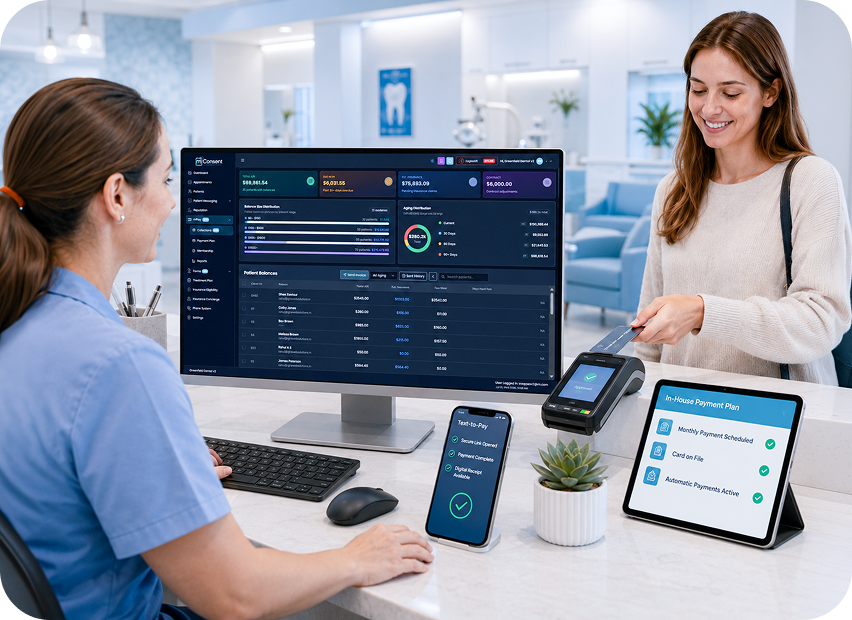
Integrates with your PMS






You’ve seen where revenue quietly disappears. Here’s the payment side of it.
A payment solution for dental practices has to own the last mile - the four leaks between “treatment done” and “money posted to your ledger.” Three you fix by collecting better. The fourth needs something new.
Ignored invoices
Patients intend to pay, but paper statements sit in a drawer while your A/R ages past 90 days.
Processing fees
Typical processors take 3–4% of everything you collect - thousands per month at practice volume.
Manual posting
Every payment your team re-keys into the PMS is time lost and a reconciliation error waiting to happen.
Uninsured patients who walk away
~70 million U.S. adults have no dental insurance. They decline treatment, skip recall - and drift to whoever gives them a reason to stay.
Fixed by Patient Memberships (new)
Request. Collect. Post. Grow.
The same flow for every payment type: a terminal swipe, a Text-to-Pay link, or an in-house plan installment - from one dashboard.
Request
Charge at the terminal, text a payment link, set up a plan, or enroll a member - from one dashboard.
Collect
Patients pay their way: tap, chip, Apple Pay, Google Pay, or saved card-on-file. No app, no account.
Post
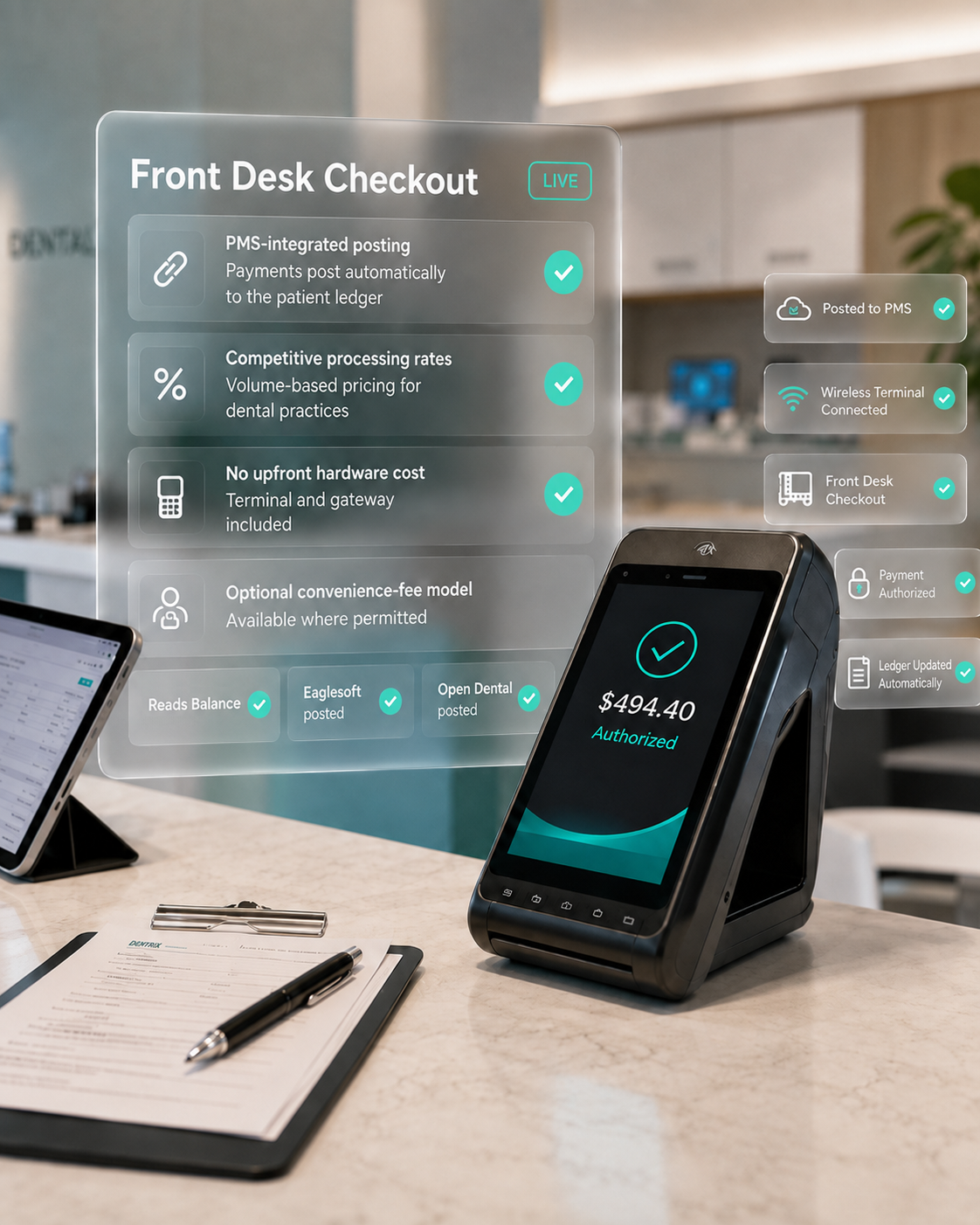
Every payment posts to the correct patient ledger in your PMS automatically. Zero double-entry.
Grow
Memberships turn uninsured visitors into recurring-revenue patients who come back twice as often.
Terminals that talk to your PMS
A fully integrated wireless card terminal for front-desk checkout. Tap, insert, or swipe - and the transaction is designed to appear on the patient’s ledger in Eaglesoft or Open Dental without anyone re-typing it.
Text2Pay clears your aging report
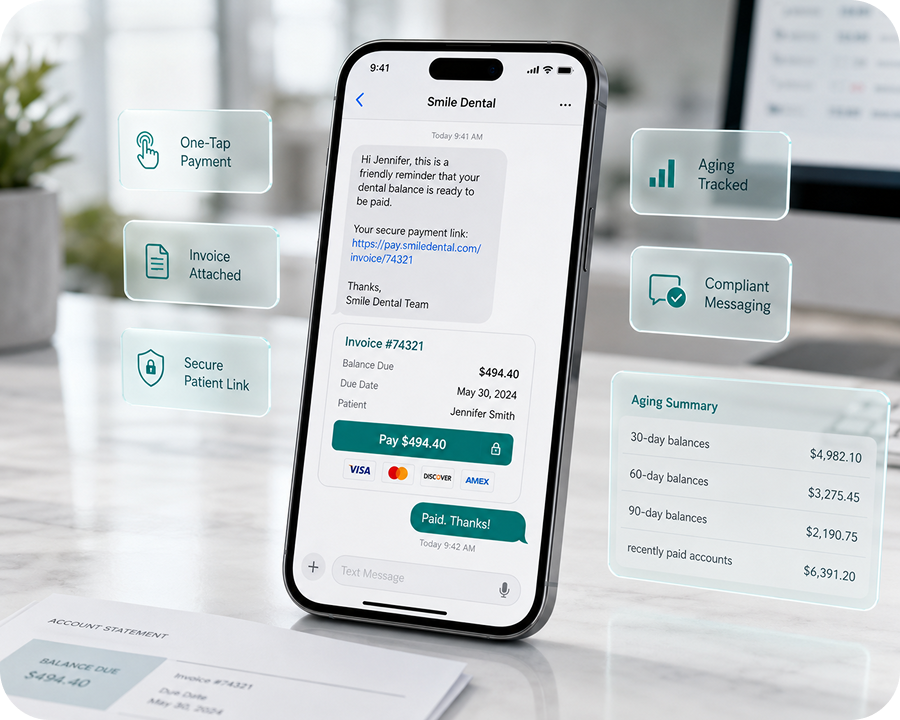
When a patient walks out with a balance, your front desk sends a Text-to-Pay link from mPayr. The patient taps, sees the invoice, and pays from their phone. No paper statement, no phone call, no chasing.
Payment plans that collect themselves
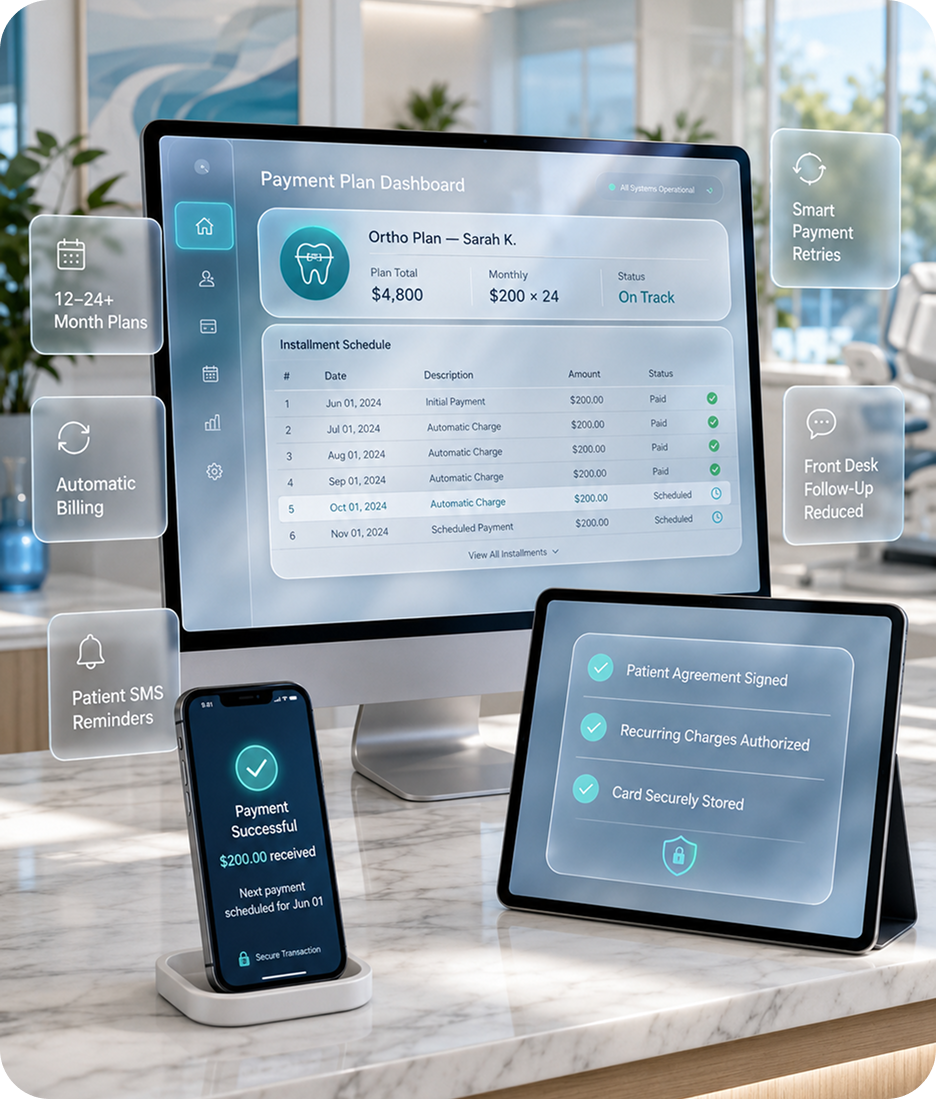
Set up a practice-managed payment plan in minutes. Patient authorizes the recurring charges. mPayr handles the contract, the reminders, and the auto-nudge - your front desk stops chasing payments manually.
Patient Memberships - your in-house dental membership plan, on autopilot
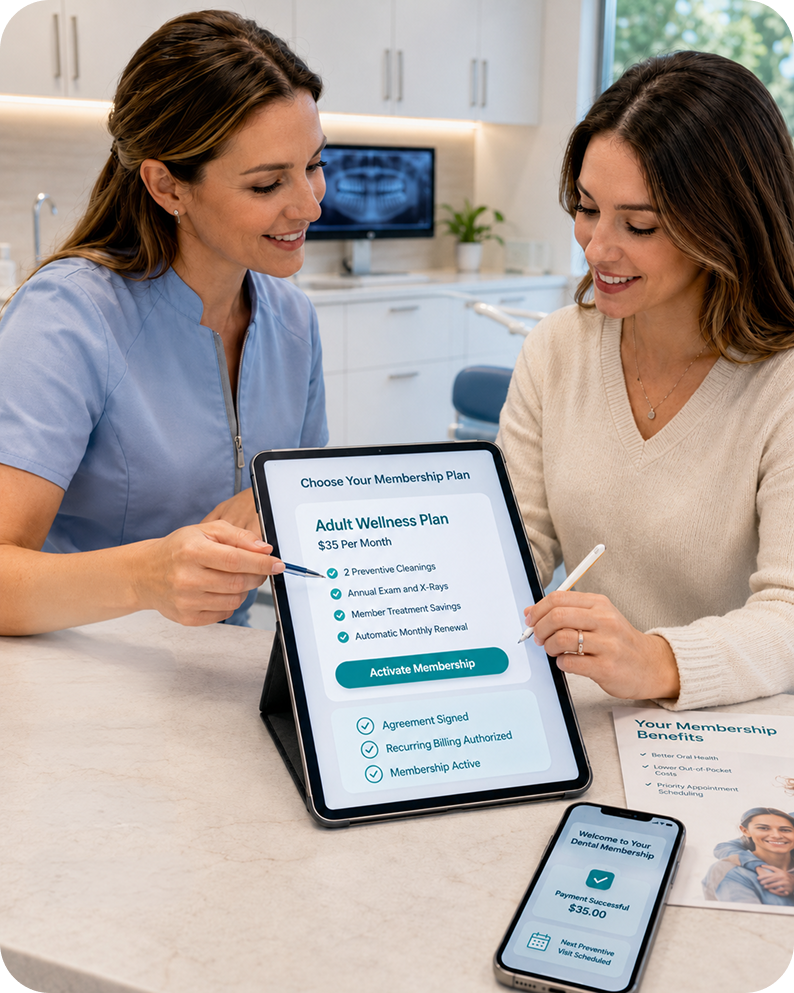
Members are your best patients
Patients on a dental membership plan behave differently - they show up, accept treatment, and stay.
850 members. $425,000 a year that didn’t exist before.
A general practice in the mConsent network (verified - name withheld at the practice’s request). One simple plan, no insurance paperwork, no third-party membership software fees - just recurring revenue from patients who used to have no reason to commit.
The plan they built
| Annual fee | $500 / patient / year |
| Included | 2 cleanings · X-rays · exam & check-up |
| Enrollment | Front desk + texted link, under 2 minutes |
| Billing | Auto-renews on card-on-file, posts to the ledger |
What it created
in recurring membership revenue - from 850 enrolled patients who previously had no plan, no schedule, and no reason to stay.
And that’s before counting what members do next: patients on membership plans visit ~2× as often and accept more treatment than uninsured patients.
$99/month. Everything included. No per-member fees. Ever.
One flat fee covers the entire payment solution for your dental practice - terminal, gateway, Text2Pay, payment plans, and your dental membership program - plus volume-based processing rates confirmed before activation.
| What you pay | mPayr Memberships | BoomCloud | Kleer / Clerri | Plan Forward |
|---|---|---|---|---|
| Platform fee | $99/month - software, gateway & terminal included | $397/month software only | Unpublished - sales call required | Unpublished - sales call required |
| Setup fee | $0 | Not published | Unpublished | Unpublished |
| Per-member fee | None | $3.50 / member / month | Unpublished | None claimed |
| Payment processing | Built in - posts to your PMS | Separate processor | Separate processor | Separate processor |
| PMS ledger posting | Automatic (Eaglesoft, Open Dental) | - | - | - |
| Annual cost at 400 members | $1,188 - flat, regardless of members | ≈ $21,700 / year | Quote-only | Quote-only |
Built for Dentrix, Eaglesoft, and Open Dental
Every payment - terminal, Text-to-Pay, email, QR, or plan installment - is designed to post directly to the patient’s ledger in your existing PMS. mPayr connects through sanctioned integration channels with each platform, so your front desk doesn’t re-type transactions at the end of the day.
Enterprise-grade payment security
mPayr handles card data through certified payment partners using tokenization and end-to-end encryption. Patient information flows across the platform under executed Business Associate Agreements.
What processing fees could look like on mPayr
Move the sliders to model processing costs at your practice’s volume. The number on the right is illustrative. Actual savings depend on your card mix, card type, and MSA terms.
Practices like yours, on the record
“Saved $100K over 2 years.”
“Our aging report has never looked this clean.”
“850 patients on our $500/year plan - that’s $425,000 in recurring revenue we simply didn’t have before.”
Security, compliance, and the questions everyone asks
The questions office managers and dentists ask before they switch to mPayr.
mPayr is a complete payment solution for dental practices - one platform for in-office terminals, Text2Pay, in-house payment plans, and patient memberships. It’s built specifically for dental practices, so every payment type posts to your PMS patient ledger automatically.
Most dental payment solutions handle one thing - processing, or memberships, or plans - and leave you stitching together separate tools and a separate processor. mPayr is a single dental practice payment solution: terminals, Text2Pay, plans, and memberships in one dashboard, all posting to the same patient ledger, at one flat $99/month with volume-based processing rates.
$99/month per location covers everything - terminal, gateway, Text2Pay, payment plans, and Patient Memberships, with no setup fee and no per-member fees. Processing rates are volume-based - most practices pay less than the typical 3–4% - and are confirmed in your agreement before activation. No long-term lock-in. A 15-minute demo gets you a real quote.
No. Memberships are savings plans your practice runs directly: patients pay you a monthly or annual fee for included preventive care and discounted treatment. They are not insurance products. mPayr provides template plan language, and state rules vary - we’ll flag what applies to your state during setup.
Eaglesoft (Official Technology Partner) and Open Dental (API integration) - all payment types (terminal, Text2Pay, plans, and memberships) post to the same patient ledger automatically. Dentrix (Authorized Connected Partner) is integrated for read-only balance information; ledger posting is handled manually.
No. Plans are practice-managed installment arrangements between you and your patient - mConsent is not a lender. State laws on installment arrangements vary; signed agreements are stored in the system.
Optional convenience-fee pass-through is supported where state law permits. We’ll configure it for your state during onboarding.
Most offices build their plan in under an hour with our templates and enroll their first members the same week. Your front desk gets a one-page script, and patients enroll in under two minutes.
Not if you use mPayr. Standalone membership platforms typically charge $99–$399+/month plus per-member fees, and still need a separate payment processor. With mPayr, plan building, enrollment, recurring billing, and PMS ledger posting are all part of your $99/month - no additional software cost and no per-member fees, however large your program grows.
Yes. mPayr supports multi-location payment operations today, with group roll-up reporting for memberships on the roadmap. Book a group demo and we’ll walk through your locations’ setup together.
See all four pillars in 15 minutes
One demo covers terminals, Text2Pay, payment plans, and your new membership program - with your PMS on the screen.
Multi-location group or DSO? Book a group demo
Important disclosures
Outcomes depend on patient mix, payment partners, card networks, PMS integration status, and other factors outside mConsent’s control, so collection speed, processing costs, and operational time savings vary by practice. Figures, comparisons, and testimonials on this page are illustrative; your specific plan tiers, hardware terms, processing rates, and service terms are set in your Master Service Agreement. mConsent operates as a Business Associate under HIPAA and executes a BAA with each customer.
The short version. Outcomes depend on patient mix, payment partners, card networks, PMS integration status, and other factors outside mConsent’s control — so collection speed, processing costs, and operational time savings vary by practice. Figures, comparisons, and testimonials on this page are illustrative; your specific plan tiers, hardware terms, processing rates, and service terms are set in your Master Service Agreement. mConsent operates as a Business Associate under HIPAA and executes a BAA with each customer. Card authorization and clearing are performed by PCI-compliant payment partners, not by mConsent; mConsent does not store primary account numbers on its own servers.
“Collects Faster” headline & outcome claims. Statements on this page about faster collection, reduced outstanding balances, and operational time savings describe the design intent of the mPayr platform and reflect illustrative or average reported outcomes from mConsent customers. Individual practice results depend on practice size, treatment mix, patient demographics, collection workflows, and how the platform is used day-to-day. None of the language on this page constitutes a guarantee of specific financial or operational outcomes for any individual practice.
Testimonials & case studies. Testimonials, quotes, and case-study figures on this page, including “Saved $100K over 2 years,” “Our aging report has never looked this clean,” and “850 patients on our $500/year plan,” describe individual, verified results from specific mConsent customers (named or anonymized at the practice’s request). These are illustrative examples, not typical or expected outcomes. No testimonial constitutes a guarantee of similar savings, revenue, or membership enrollment for any other practice.
Payment posting & timing. Transactions are designed to post promptly to the correct patient ledger in Dentrix, Eaglesoft, or Open Dental through sanctioned integration channels. Posting intervals depend on the PMS integration mode, network conditions, and whether the payment clears authorization first. Posting behavior on Dentrix specifically depends on the Dentrix version in use at the practice (including but not limited to G7, Dentrix Ascend, and Dentrix Enterprise); not all versions expose the same integration surface. Your account manager confirms exact compatibility during onboarding, and practices on older or non-supported versions may experience a reduced feature set. References to “automated PMS posting” mean your front desk does not re-type transactions manually; they do not represent a guaranteed time-to-ledger or a service-level commitment.
Pricing, hardware & Master Service Agreement. Hardware pricing, payment-partner processing rates, plan fees, integration setup, onboarding timelines, and contract terms are confirmed in each practice’s signed MSA and supersede summary language on this page. Where this page uses phrases like “no upfront hardware cost,” the specific terms — including any applicable shipping, replacement, damage, or early-termination considerations — are detailed in the MSA. Where this page cites a specific figure such as “$99/month all-in” or “5,000+ practices served since 2017,” that reflects current list pricing and mConsent’s installation base as of the date noted on the page; final pricing, applicable fees, and plan-tier eligibility are confirmed in your signed MSA.
Competitor comparison data. Competitor pricing shown in comparison tables (e.g., BoomCloud, Kleer/Clerri, Plan Forward) reflects pricing published on each vendor’s website as of the date noted on this page, or is marked “unpublished” or “quote-only” where the vendor requires direct contact for pricing. Vendor pricing is subject to change without notice and should be verified directly with the vendor before relying on this comparison. mPayr’s own processing rates are volume-based, confirmed with each practice before activation, and involve no long-term lock-in.
In-house payment plans. mPayr in-house payment plans are practice-managed arrangements funded by patient-authorized recurring charges to a card on file. They are not loans or extensions of credit made by mConsent. State-specific rules governing installment arrangements, consumer disclosure, and any licensing requirements vary materially — particularly for multi-month ortho contracts. Each practice is responsible for confirming compliance with its applicable state rules before enabling longer-term plans, and should consult its own advisors on state-specific requirements. Not insurance: a dental membership plan is a savings program the practice runs itself. It is not an insurance product, is not regulated as one, and does not guarantee that any specific treatment will be covered or discounted unless the practice offers it.
Convenience fees & surcharging. Passing the card processing fee to the patient (sometimes called a convenience fee or surcharge model) is regulated by state law and by card network rules (Visa, Mastercard, Discover, American Express). Rules vary by state and by card type, include disclosure and signage requirements, and some states prohibit the practice entirely. mPayr can configure compliant pass-through only where permitted; practices confirm eligibility with their own advisors before enabling. Card network rules generally prohibit surcharging on debit, prepaid, HSA, and FSA cards, and cap credit card surcharges at 3%; mPayr configures pass-through fees only within these limits and only where state law permits.
SMS, Text-to-Pay & TCPA consent. Text messages sent through mPayr require prior patient consent under the Telephone Consumer Protection Act (TCPA) and applicable state rules. mPayr captures and records SMS opt-in during patient setup so practices can demonstrate consent. Standard message and data rates may apply to the recipient. Practices should not send Text-to-Pay messages to patients who have not opted in, or who have subsequently opted out.
ROI calculator & illustrative figures. The processing-cost calculator is illustrative only. Actual processing costs depend on card mix (credit vs. debit, rewards tier), transaction method (tap, insert, swipe, or keyed), payment partner pricing, monthly volume, and the commercial terms in your signed MSA. The “pass processing fee to patient” toggle reflects a best-case scenario in which the convenience-fee model is both fully configured and permitted under applicable state law and card network rules. It is not a representation of typical outcomes. As noted under “Convenience fees & surcharging,” this toggle cannot be enabled on debit, prepaid, HSA, or FSA cards, and any credit surcharge modeled here is capped at 3% regardless of the value shown on the slider.
Integrations & trademark notices. mConsent is an Authorized Connected Partner for Dentrix, an Official Technology Partner for Eaglesoft, and integrates with Open Dental via its published API. Additional PMS integrations are available; specific compatibility is confirmed during onboarding. Trademarks referenced on this page — including Dentrix, Eaglesoft, Open Dental, Visa, Mastercard, Discover, American Express, Apple Pay, and Google Pay — are the property of their respective owners and are used here for descriptive purposes only. No endorsement or affiliation is implied beyond the partner designations listed above.
HIPAA & Business Associate Agreement. mConsent operates as a Business Associate under HIPAA and executes a Business Associate Agreement (BAA) with every customer practice. Patient information handled through mPayr flows under that agreement, with administrative, physical, and technical safeguards in place. Card data is tokenized and handled by PCI-compliant payment partners; mConsent does not store primary account numbers (PAN) on its own servers. See our security practices for additional detail.
mPayr is a dental payment platform operated by mConsent. Card authorization, clearing, and settlement are performed by licensed payment partners — not by mConsent. Patients are ultimately responsible for the balances they owe to their dental provider; collection and refund decisions rest with the treating practice.




