
Dentrix Connected PartnerConnected Partner
Dentrix integration

Get more from Dentrix without adding to your front desk’s workload.

You already trust Dentrix dental software to manage your practice. As an official Dentrix Connected Partner, mConsent simplifies your front desk workflow with dental automation by sending completed patient forms, updates, and confirmations directly into Dentrix. It also helps your team use schedule, recall, treatment plan, and balance information to keep patients coming back and payments on track.

mConsent intake forms connected to the Dentrix chart
5,000+
Practices since 2017
5.5M+
Patients served
11M+
Appts managed
4.9
Capterra
4.9
Software Advice
4.6
G2
Dentrix Connected PartnerConnected Partner
Dentrix integration
02How it works

Dentrix stays your system of record.

No new system to learn. Your team keeps working in Dentrix while mConsent handles patient forms, appointment confirmations, and payments in the background, keeping patient information and results accessible where your team already works.
01
Dentrix shares what mConsent needs
Your schedule, patient details, recalls, treatment plans, insurance, and balances.
02
Patients take care of it from their phones
They complete digital dental forms, sign documents, confirm appointments, and make payments before they arrive.
03
Results sync back to Dentrix
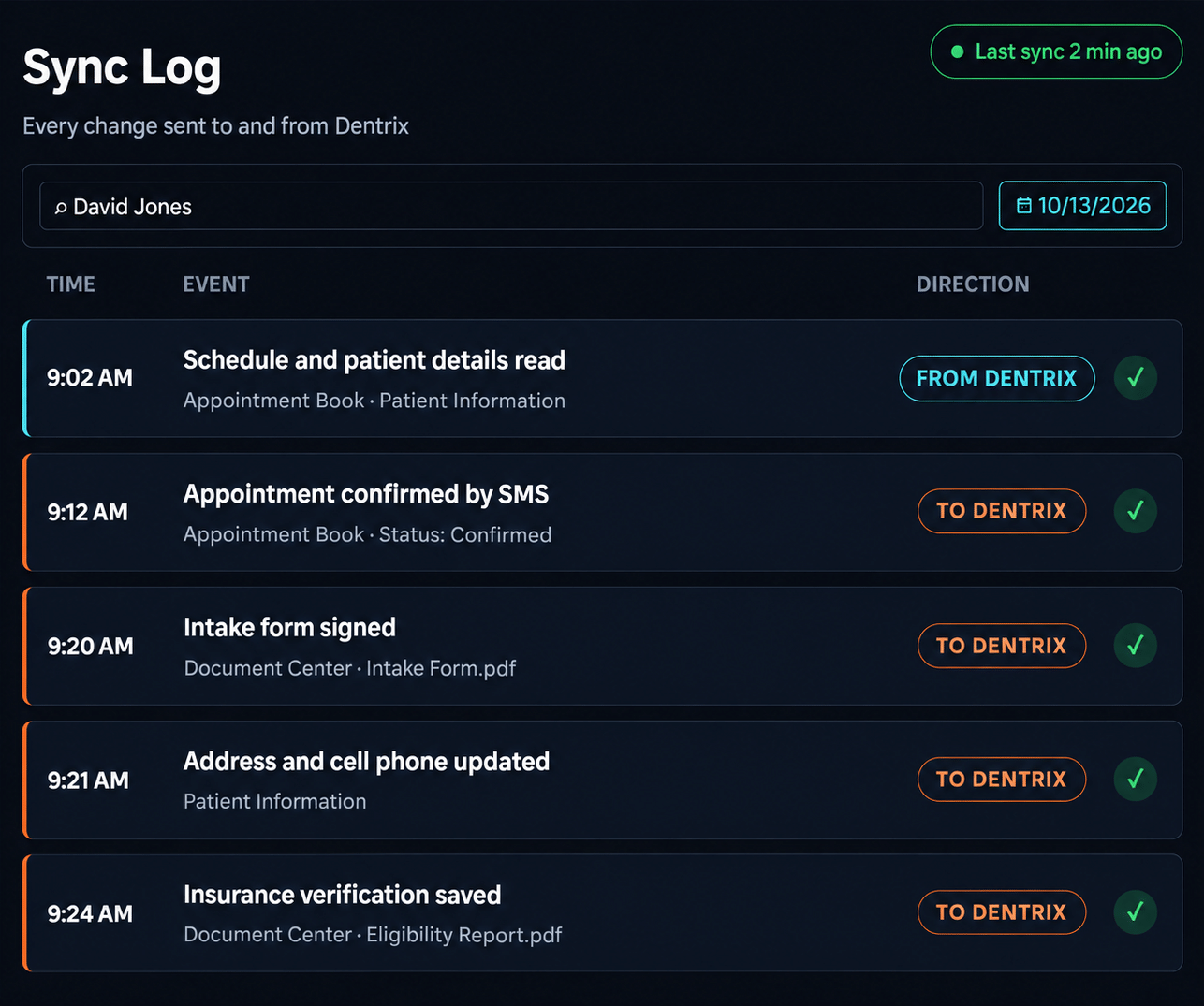
Completed forms go to the Document Center and patient records are updated. Every sync is logged, so your team can see what was sent and when.
David Jones record in Dentrix
03What syncs

Your Dentrix, less the paperwork.

If your team still scans forms, manually enters medical histories and calls to confirm appointments, mConsent automates these tasks with dental automation software, keeping Dentrix updated with the information your team needs.

mConsent
Patient side
Patient info flows in
Your schedule flows out
Dentrix
System of record

How mConsent and Dentrix work together

Updates DentrixUses Dentrix dataBoth ways

Patients

3 syncs
Inactive patientsUses Dentrix dataSee who hasn’t been in for a while and invite them back with a friendly message.

Health & alerts

2 syncs

Forms

1 sync

Scheduling

4 syncs

Recall

1 sync

Billing & treatment

2 syncs

Insurance

2 syncs

Analytics

1 sync

See the sync, screen to screen.

Real mConsent and Dentrix screens, with the data that moves between them. Tap any screen to enlarge it.

01

Patient details stay correct, without retyping

When a patient submits a form with a new address or phone number, or your team updates their details in mConsent, Dentrix updates too. Nobody has to re-enter it.

Uses Dentrix dataContact info from DentrixmConsent uses the contact details saved in Dentrix, so reminders and messages always reach the right person.
Updates DentrixUpdates saved to DentrixNew details from a submitted form, or edits your team makes in mConsent, are saved to Dentrix. No re-entering.
mConsent Dentrix
02

New patients are ready before they walk in

A new patient fills out their forms at home. By the time they arrive, their profile is already set up in Dentrix.

Updates DentrixNew record in DentrixWhen a new patient completes forms online, or your team adds them in mConsent, their Dentrix record is created automatically.
Updates DentrixContact details addedAddress, phone, and email from the form are added to Dentrix, so reminders reach the patient from day one.
mConsent Dentrix
03

The dentist sees health alerts before the visit

When patients submit their medical history form, their allergies, medications, and conditions update in Dentrix. Your clinical team sees them before the patient sits down.

Updates DentrixAllergies flaggedAllergies like penicillin or latex are added as medical alerts in Dentrix, so your team sees them before treatment.
Updates DentrixMedications addedMedications from the form are added to the patient’s history, so the dentist can review them before treatment.
Updates DentrixConditions addedConditions like high blood pressure or diabetes are added to the patient’s medical history in Dentrix.
mConsent Dentrix
04

Premed reminders before the visit

Some patients need antibiotics before treatment, such as after a joint replacement. mConsent sees the premed flag in Dentrix and sends a reminder ahead of time, so the visit doesn’t have to be rescheduled.

Updates DentrixReported on the formThe patient notes conditions like a joint replacement, which may mean they need antibiotics before treatment.
Updates DentrixPremed alert addedA Premedication Required alert is added in Dentrix, so the dentist and hygienist know to check first.
Uses Dentrix dataPremed reminder sentmConsent reminds the patient to take their antibiotics before the visit, so appointments don’t get rescheduled.
mConsent Dentrix
05

No more scanning paperwork

Every signed form and card photo lands in the patient’s Document Center on its own, ready to open at check-in.

Updates DentrixIntake & consent formsSigned forms are saved as PDFs in the patient’s Document Center. Nothing to print, scan, or upload.
Updates DentrixMedical history formSaved as a PDF with the date it was completed, so your team knows when it was last updated.
Updates DentrixID & insurance cardsPatients photograph their cards from their phone, and the images are saved next to their forms. No scanning.
mConsent Dentrix
06

Reminders go out on time, automatically

mConsent works from the schedule your team already keeps in Dentrix, so reminders and pre-visit forms go out at the right moment without anyone setting them up.

Uses Dentrix dataAppointment detailsmConsent reads each appointment’s date, time, and provider from Dentrix to know who to remind and when.
Uses Dentrix dataForms for each visit typeEach patient gets the forms their visit needs, whether it’s a new patient exam, cleaning, or procedure.
mConsent Dentrix
07

Everyone sees the same appointment status

Whether an appointment gets confirmed in Dentrix or in mConsent, both show the same thing. Patients aren’t asked to confirm twice.

Uses Dentrix dataNo repeat confirm requestsOnce confirmed, patients aren’t asked again, but still get a friendly heads-up before the visit.
Updates DentrixStatus updates in DentrixMark a visit confirmed or completed and Dentrix matches.
Uses Dentrix dataReview request after visitsAfter a completed visit, the patient gets a quick review request.
mConsent Dentrix
08

Confirmations without the phone calls

Patients confirm with a quick reply. Dentrix shows them as confirmed, so your team can skip the call list.

Updates DentrixConfirm by textPatients reply “C” to their reminder text, and the appointment is marked confirmed in Dentrix right away.
Updates DentrixConfirm by emailOne click on the email reminder marks the appointment confirmed in Dentrix, just like a text reply.
mConsent Dentrix
09

Patients come back for their cleanings

When a patient is due for their six-month visit, mConsent sends a friendly reminder to book. Nobody has to work through a recall list.

Uses Dentrix dataRecall due datesRecall due dates from Dentrix trigger reminders to book, keeping your hygiene schedule full without a recall list.
mConsent Dentrix
10

Fill last-minute openings fast

When someone cancels, text the patients on your ASAP list who want an earlier time. The chair gets filled instead of sitting empty.

Uses Dentrix dataASAP listWhen a slot opens, text everyone on your Dentrix ASAP list at once in a few clicks.
mConsent Dentrix
11

Patients pay from their phone

Patients get a text with their balance and pay in a few taps, or pay at the front desk terminal. Your team spends less time on statements and follow-ups.

Uses Dentrix dataPatient balanceThe balance from the Dentrix ledger is sent as a secure text-to-pay link patients can pay in a few taps.
In mConsentPayments trackedEvery text and terminal payment is recorded in mConsent, so your team can see who has paid at a glance.
mConsent Dentrix
12

Planned treatment actually gets booked

Patients review and sign their treatment plan digitally, and get reminders if they haven’t booked yet.

Uses Dentrix dataTreatment planPatients review and sign their plan from their phone, and get reminders to book if they haven’t yet.
mConsent Dentrix
13

Insurance checked before the visit

mConsent checks coverage using the insurance already on file, so your team isn’t stuck on hold with insurance companies.

Uses Dentrix dataInsurance on fileThe carrier and member ID saved in Dentrix are used to check coverage before the visit. No time on hold.
Updates DentrixCoverage report savedThe coverage report is saved as a PDF in the patient’s Document Center, ready at check-in.
mConsent Dentrix
Also from mConsent · Insurance ConciergeWant to hand off insurance work entirely? Insurance Concierge is our human-verified insurance service. Real specialists confirm eligibility and benefits with carriers for you.
Learn more
14

Coverage answers, ready at check-in

Every insurance check is saved to the patient’s record, so the front desk can answer cost questions with confidence.

Updates DentrixCoverage summaryPlan, coverage status, deductibles, and remaining benefits on one page, so you can give clear cost estimates.
Updates DentrixSaved to Document CenterFiled in the Document Center with the date it was checked.
mConsent Dentrix
Also from mConsent · Insurance ConciergeWant to hand off insurance work entirely? Insurance Concierge is our human-verified insurance service. Real specialists confirm eligibility and benefits with carriers for you.
Learn more
15

See how your practice is doing at a glance

Production, hygiene, and new patient numbers from Dentrix, shown as clear charts and graphs on one simple dashboard. No reports to run.

Uses Dentrix dataPractice numbersProduction, hygiene, and new patient numbers from Dentrix, shown as easy-to-read charts and graphs.
mConsent Dentrix
04Connected modules

Every module works with the data already in Dentrix.

Each module connects with your Dentrix data and is configured for your practice during onboarding.

Paperless Intake

Patients complete forms, sign documents, and share insurance details and medical history from their phones before arriving. Completed Dentrix patient forms are saved to the Dentrix Document Center, ready for check-in.

Communication

Automated reminders, appointment confirmations, and two-way texting run on your Dentrix schedule, helping reduce missed appointments and keep chairs filled. TCPA-compliant consent is built in.

mPayr

Turn Dentrix balances into payments with text-to-pay or the in-office terminal. Every payment is tracked in mConsent, making it easier to manage collections.

Zaha AI

An AI receptionist that answers routine scheduling calls 24/7, so you can capture new-patient inquiries even when your front desk is busy or closed.

Insurance Concierge

Verifies eligibility and benefits using the insurance information in Dentrix, then saves the report to the Document Center. Your team spends less time on payer calls and hold times.

Online Scheduling

Let patients request appointments online anytime. Dental scheduling software follows your provider, operatory, and appointment-type rules, while your team reviews each request before confirming the booking.

More features work with Dentrix

More ways dental practices use mConsent with their existing Dentrix workflows.

FormsLive

eSign treatment plans

Patients review and sign treatment plans digitally before or during their visit.

FormsLive

Pediatric forms

Intake forms designed for minors and completed by a parent or guardian.

RemindersLive

Recall reminders

Automated recall messages based on Continuing Care due dates in Dentrix help patients book their next visit.

RemindersLive

Treatment reminders

Follow up with patients about unscheduled treatment identified in the Dentrix Treatment Planner.

MessagingLive

Mass messaging

Send targeted messages to filtered groups of patients from Dentrix.

MessagingLive

Patient reactivation

Bring back patients Dentrix shows haven’t been in for a while.

ReputationLive

Review requests with auto-send

Request reviews automatically after completed appointments.

ClinicalLive

ePrescription

Send prescriptions electronically from mConsent.

05FAQ

Dentrix integration, answered.

Answers to what practices usually ask before connecting.

Yes. mConsent is an official Dentrix Connected Partner, and we work with Henry Schein One to build and test our integration to Dentrix standards.
mConsent works with all currently supported Dentrix versions. We’ll set everything up for your practice during onboarding.
mConsent updates patient demographics, medical history, and alerts, and saves every completed form, including consents, intake, ID cards, and pediatric forms, to the Dentrix Document Center. It also updates appointment status and adds new patients. If you use mConsent Insurance Verification, reports are saved to the Document Center too.
mConsent reads patient demographics, appointments and their status, Continuing Care (recalls), pre-med alerts, your ASAP list, Treatment Planner entries, insurance, Ledger balances, and inactive patients for Patient Reactivation. For analytics, it also pulls scheduled and completed production, new patients, hygiene (by appointment type), and outstanding balances.
mConsent operates as a Business Associate under HIPAA and executes a Business Associate Agreement (BAA) with each customer. Specific safeguards, access controls, and breach-notification obligations are described in the BAA and in mConsent’s security documentation.
SMS reminders capture express patient consent and honor STOP-to-unsubscribe requests consistent with the federal Telephone Consumer Protection Act (TCPA), state messaging laws, and carrier requirements. The practice is responsible for the lawful use of these features.

Also works with Eaglesoft and Open Dental.

Using a different system at another location? mConsent connects with other leading practice management systems too, and we confirm what’s supported during onboarding.

06Get started

See what mConsent can do for your Dentrix office.

In a short demo, we’ll show you forms landing in the Document Center, confirmations updating the Appointment Book, and balances turning into payments, all built around how your office works.