
 Connected Partner
Dentrix integration is designed to improve dental workflows from intake to follow-up.
As a Dentrix Connected Partner, mConsent is designed to write digital intake forms, reminders, payments, and AI-assisted call data back to Dentrix and other major PMS, improving dental workflows so your chart stays current.
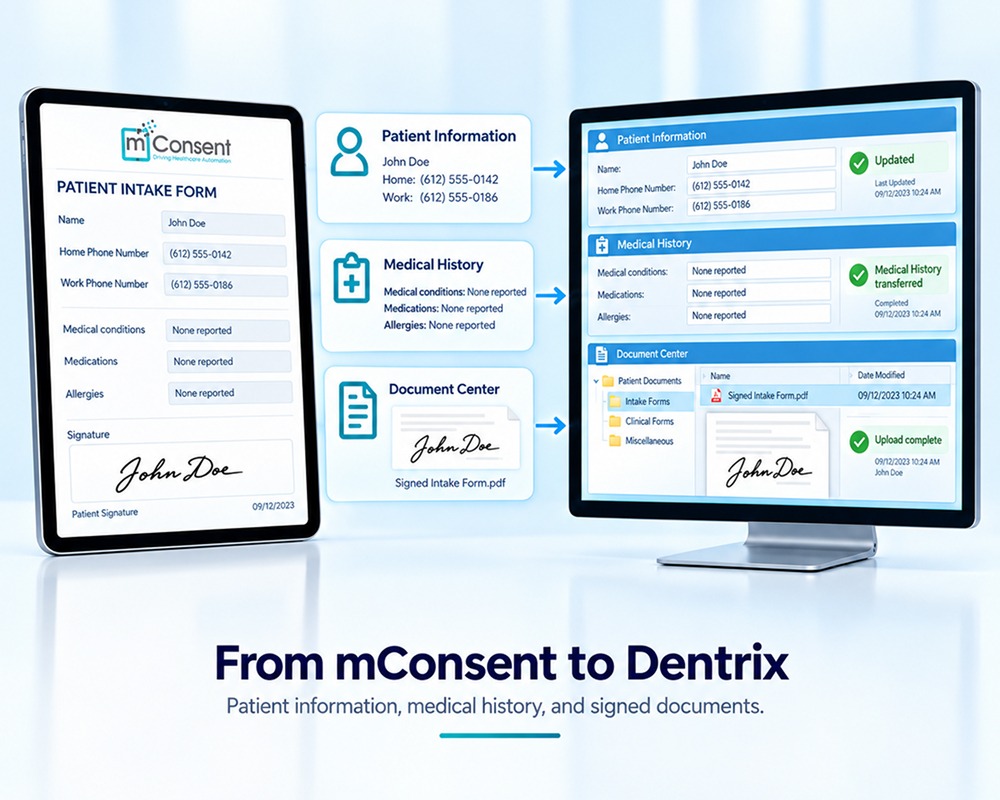
Designed to remove the manual re-entry between front desk and chart.
Most Dentrix practices already collect intake data, send reminders, and take payments, but in pieces. mConsent is designed to connect those pieces and improve dental workflows back into Dentrix.
Digital intake to chart
Designed to push completed intake responses, signatures, and demographics back to the patient’s Dentrix chart so the front desk avoids manual re-keying.
Reminder & confirmation status
Designed to log SMS and email reminder activity against the appointment in Dentrix. SMS uses TCPA-compliant consent language and STOP-to-unsubscribe handling.
Payments & financing
Designed to record patient payments and financing activity from mPayr against the patient’s ledger, keeping Dentrix posting consistent with what was actually collected.
AI call summaries
Designed to attach Zaha AI call transcripts and summaries to the patient record. AI is designed to route and summarize — not to make clinical determinations.
Insurance & eligibility events
Designed to capture eligibility check events from Insurance Concierge and surface the result alongside the appointment record. Final commercial terms and posting rules apply.
Configurable sync cadence
Designed to let your practice configure how frequently the connector syncs with Dentrix — from on-event to scheduled batches — based on what your team needs.
One Dentrix integration, with the chart as truth.
Dentrix continues to be the system of record. mConsent is designed as a workflow layer that captures patient responses, payments, reminders, and call activity, then improves dental workflows by writing results back at the cadence your practice configures.

The modules that read or write to Dentrix.
Available data fields, sync cadence, and supported workflows depend on your Dentrix version, your network configuration, and options selected during onboarding.
Paperless Intake
Designed to collect intake forms, signatures, insurance details, and medical history before the visit and post results to the Dentrix chart.
Communication
Designed to send reminders, confirmations, and 2-way patient messaging with TCPA-compliant consent and to log activity against the Dentrix appointment.
mPayr
Designed to take patient payments at the chair, by text-to-pay, or after the visit and to record the transaction against the Dentrix ledger.
Zaha AI
AI phone coverage designed to route routine scheduling calls and attach call summaries to the patient record.
Insurance Concierge
Designed to run eligibility and benefits workflows around the appointment and surface the result alongside the patient record.
Online Scheduling
Designed to write requested appointments back to Dentrix with the operatory, provider, and appointment-type rules your practice configures.
mConsent is designed to work with Dentrix and other major PMS.
If your practice uses Eaglesoft, Open Dental, or another system, the same connector pattern applies. Onboarding confirms the specifics.
Common questions about the Dentrix connector
Quick answers about how mConsent is designed to work alongside Dentrix.
See how mConsent improves your Dentrix workflows.
A short demo designed for your stack intake to chart, payments to ledger, reminders to appointment. Per your master services agreement.
mConsent is a Dentrix Connected Partner. Capability described on this page is illustrative based on typical configurations; actual results vary by Dentrix version, network, and practice. Pricing and program terms are governed by the MSA at activation. mConsent operates as a Business Associate under HIPAA and executes a BAA with client practices.




