
Dental patient communication software, built for the front desk.
Dental patient communication software with automated reminders, two-way texting, waitlist messaging, recall follow-ups, and a practice mobile app, all integrated with your dental PMS on a HIPAA Business Associate framework. Designed to remove repetitive communication work.
Front-desk communication leaks that quietly compound
Missed calls, forgotten appointments, and unfilled cancellations each look small in isolation. Over a quarter, they compound into real revenue pressure and front-desk staff burnout.
No-shows
Patients forget. Empty chairs put pressure on production targets and crowd the reschedule queue.
Phone tag
Your team spends mornings calling, leaving voicemails, and waiting for callbacks that rarely come.
Unfilled cancellations
Last-minute cancellation? By the time someone calls the waitlist one patient at a time, the slot is gone.
Unscheduled treatment
Patients leave with a treatment plan and never book. Without consistent follow-up, case acceptance drifts.
Dental patient communication software in one dashboard
Six tools, one dashboard, one practice number designed to replace the ad hoc mix of manual calls, personal phones, and sticky notes that most dental practices still use.
Appointment reminders
Configurable SMS and email reminders (for example, 7 days, 1 day, and morning-of). Patients confirm or reschedule with a single reply. Intake forms can be attached to the same thread.
Two-way texting
Patients text your practice number; staff respond from a shared dashboard, not personal phones. Share links, scheduling buttons, and attachments. STOP / HELP opt-out handled automatically.
Waitlist & Quick Fill
When a patient cancels, reach your opted-in waitlist with a single high-volume batch message. First responder gets the slot — your team doesn’t spend the morning on the phone.
Recall & treatment follow-up
Automated cadences for hygiene recall and unscheduled treatment plans — designed to keep patients in contact with the practice between visits, with patient education tied to treatment codes.
VoIP phone (via partner)
mConsent integrates with a certified telecom partner to surface caller context — upcoming appointment, insurance, balance — when a known patient calls. VoIP service is delivered by the partner, not by mConsent.
Practice mobile app
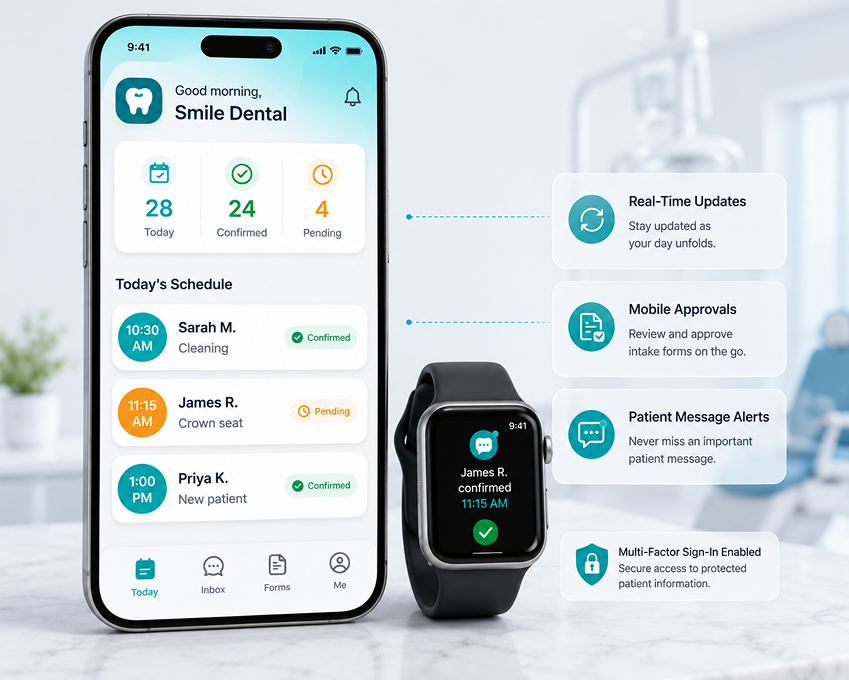
Manage reminders, review threads, and approve intake forms from anywhere — with role-based access. Available for iOS and Android.
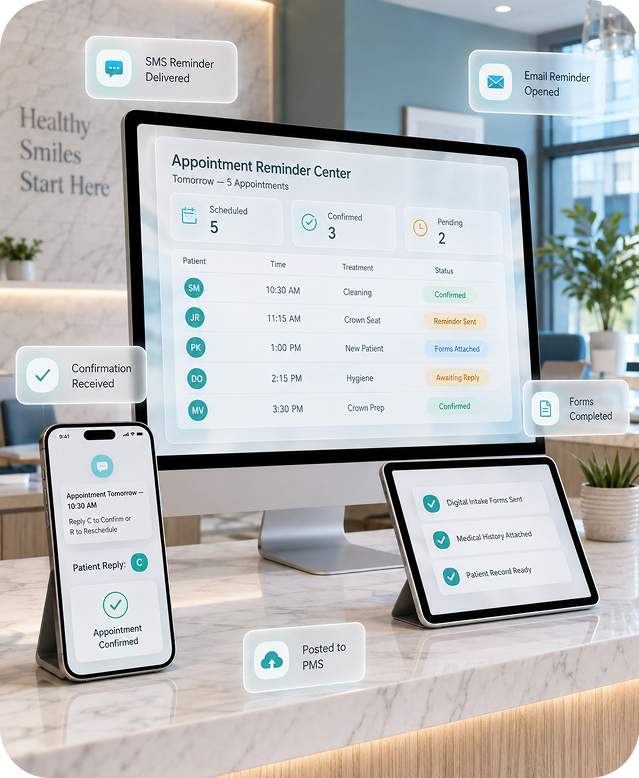
Configurable reminders, designed to reduce missed appointments.
Set the cadence once; patients confirm in a single tap.
mConsent sends appointment reminders by SMS and email on a schedule you configure — for example, 7 days, 1 day, and the morning of the visit. Patients can confirm or reschedule with a single reply, and confirmations are designed to flow back to your PMS. Intake forms can be attached to the reminder so patients complete paperwork before arrival.
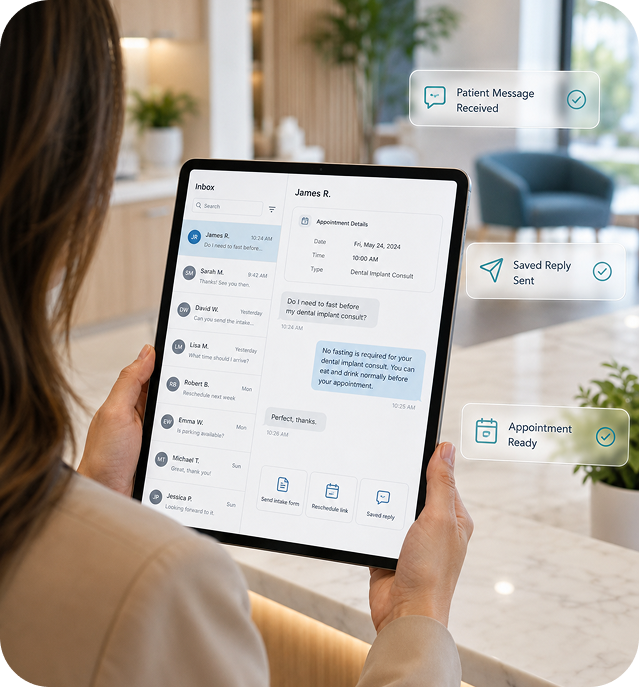
Real conversations from your practice number — not a staff cell.
SMS threads that stay in the practice record.
Patients text your existing practice number; your team replies from a shared inbox. Attach documents, send scheduling links, or escalate to a phone call — without exposing personal phone numbers. STOP and HELP are handled automatically. Message threads live in the patient record, not a staff cell phone.
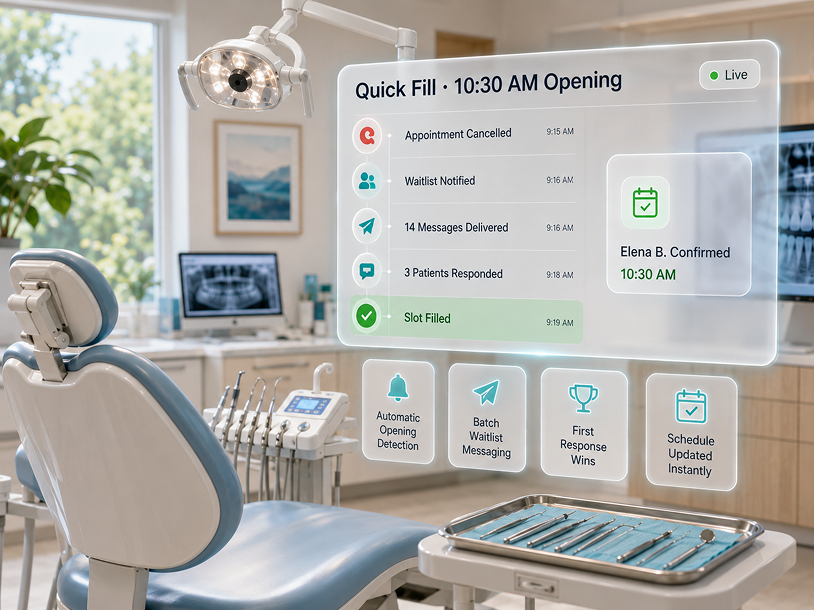
Fill openings and re-engage dental patients without phone-call grind.
Batch messages to your opted-in waitlist and recall cohorts.
When an appointment opens up, Quick Fill sends a batch message to patients who have opted in to your waitlist. Recall cadences run on a schedule you define — designed to keep hygiene patients, lapsed patients, and patients with unscheduled treatment plans in contact with the practice.
Your dashboard in your pocket.
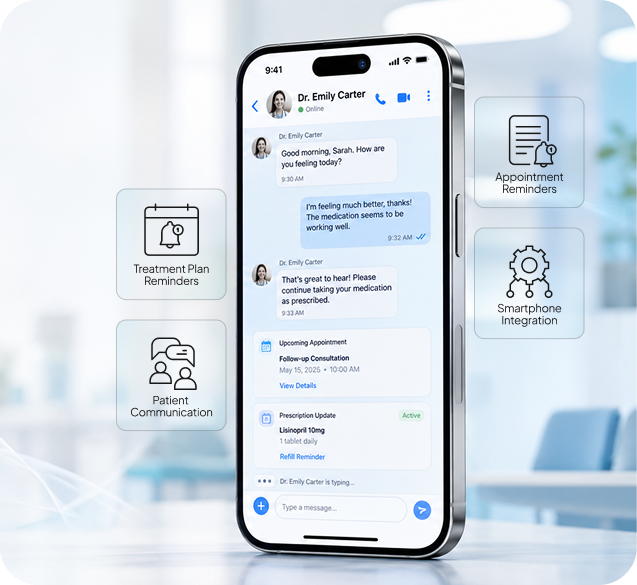
Reminders, threads, and approvals on iOS and Android.
The mConsent practice app lets managers and owners check the day at a glance, respond to patient threads, approve intake forms, and track communication — without needing to be at the front desk. Role-based access keeps team members on the information that matters to their role.
How dental patient communication software fits your day
Three steps from your PMS schedule to a confirmed chair. Once configured, day-to-day activity runs quietly in the background.
PMS schedule feeds mConsent
mConsent reads appointment data from Dentrix, Eaglesoft, or Open Dental through a vendor-supported integration channel. Records, times, and treatment types auto-populate the dashboard.
Reminders and messages go out
At a cadence you configure, SMS and email reminders are sent to opted-in patients, with intake forms attached when needed. Two-way texting remains available from the same practice number all day.
Capture responses and fill gaps
Responses captured in the dashboard and designed to sync to your PMS. Cancellations can trigger Quick Fill; unscheduled treatment plans enter a follow-up cadence.
Integrates with Dentrix, Eaglesoft, and Open Dental
Our dental patient communication software exchanges patient, scheduling, and form data with leading practice management systems via vendor-supported channels to reduce duplicate manual entry between intake and PMS.

Dentrix

Eaglesoft

Open Dental
What is designed to sync
About the VoIP and phone integration
mConsent’s Smart Phone feature surfaces patient context on incoming calls (upcoming appointment, insurance, outstanding balance) but the underlying telephone service is delivered by a certified telecom partner. Please note the following before signing up for phone service through mConsent or the partner:
What the front desk feels like, before and after
Not a promise of specific dollar savings — those depend on your practice size, patient volume, and workflow. But the qualitative shift is consistent across the practices that adopt a consolidated communication workflow.
Before Manual communication
- Front desk spends mornings on reminder calls and voicemail chains.
- No-shows and last-minute cancellations create repeated schedule gaps.
- Patient texts go to a staff cell phone or get missed entirely.
- Unscheduled treatment plans age out without consistent follow-up.
- Recall and reactivation live in a spreadsheet someone has to update.
After Consolidated communication
- Reminders go out automatically on the cadence you choose.
- Patients confirm or reschedule with a reply; cancellations trigger Quick Fill.
- Patient threads live in the practice dashboard, visible to the whole team.
- Unscheduled treatment plans and recall cohorts run on structured cadences.
- Front-desk time shifts from repetitive calls to higher-value patient conversations.
Specific time-saved and revenue-recovered figures depend on the practice. Your demo team can walk through a scenario tailored to your numbers rather than an averaged figure that may not apply to your operation.
How mConsent compares for dental patient communication
A plain-language comparison with other dental communication vendors on the features most often evaluated together. For specifics, see our detailed breakdowns linked below the table.
| Feature | mConsent | Weave | NexHealth | Solutionreach |
|---|---|---|---|---|
| Automated appointment reminders | ||||
| Two-way texting from practice number | ||||
| High-volume waitlist / Quick Fill batch | — | Limited | — | |
| Treatment plan follow-up cadence | — | — | ||
| Integrates with Dentrix / Eaglesoft / Open Dental | ||||
| HIPAA BAA and TCPA tooling | ||||
| Insurance verification available on same platform | — | — | ||
| Dedicated hardware required | No | Yes | No | No |
How dental patient communication software shows up daily
Two representative workflows from the practices we see most often. Actual time savings and outcomes depend on your practice size, patient mix, and how the tools are configured.
Sarah, Office Manager
Morning huddle. Sarah opens the dashboard and sees the day’s appointments, with confirmations and pending replies already sorted. She flags one schedule gap for Quick Fill and moves on.
Midday cancellation. A patient cancels the 12:00 slot. Sarah launches Quick Fill to the opted-in waitlist and continues her other work while responses come in.
End of day. Tomorrow’s reminders have already gone out on schedule. Sarah adds one custom note about parking construction and logs off.

Maria, Front Desk
Patient check-in. An arriving patient’s intake is already complete from the reminder link. Check-in is quicker than working through a paper clipboard from scratch.
Inbound text. A patient texts with a pre-procedure question. Maria replies from the shared inbox; the conversation is captured in the patient record.
Treatment follow-up. Maria reviews patients from last week with unscheduled treatment. The follow-up cadence has already nudged them; two reply asking to book, and she schedules them in a few minutes.
Built to handle PHI the way HIPAA requires
How we operate on the platform
See dental patient communication software live
Book a demo and we will walk through reminders, two-way texting, Quick Fill, and treatment follow-up cadences on a live dashboard — with your PMS in mind.
Implementation timelines, module scope, and support terms are defined in your Master Service Agreement with mConsent.
Dental patient communication questions
Dental patient communication software consolidates appointment reminders, two-way texting, recall, and follow-up messaging into a single dashboard integrated with your practice management system. It is designed to replace manual call chains and staff-cell-phone texting with a single practice-level workflow.
mConsent’s reminder cadence, two-way confirmation, and recall cadences are designed to help reduce missed appointments. The actual change depends on your practice size, patient mix, reminder schedule, and how the follow-up is configured. The demo team can walk through a realistic scenario for your practice rather than a single averaged figure.
mConsent operates as a Business Associate under HIPAA and executes a single Business Associate Agreement (BAA) with your dental practice — not one per patient. Patients do not sign BAAs; they receive your practice’s Notice of Privacy Practices, which is a separate HIPAA document your practice already provides. Messages that may contain PHI (reminders referencing appointment specifics, follow-up messages about treatment, and two-way replies) are handled under that BAA with administrative, physical, and technical safeguards. Patients retain the choice of what information they include in replies from their personal devices.
Yes. Patient SMS requires prior express consent under the Telephone Consumer Protection Act. mConsent supports consent capture, STOP and HELP handling, message frequency disclosure, and 10DLC sender registration with US mobile carriers. Promotional or marketing messages may require separate consent under certain state laws. Practices remain responsible for the content they send.
10DLC is the US mobile carrier framework that requires businesses sending text messages from 10-digit long codes (typical practice numbers) to register their brand and use case. Registration is designed to reduce spam and improve deliverability. mConsent handles 10DLC registration as part of onboarding and describes the requirements during setup.
Yes. STOP, HELP, and similar opt-out keywords are handled automatically. Patients who reply STOP are removed from the active SMS list for the relevant category, and records are maintained to support practice compliance with TCPA.
Quick Fill is a high-volume batch message to your opted-in waitlist when an appointment opens up. The first responder can be booked into the slot. Throughput depends on 10DLC carrier limits and your plan’s fair-use terms; actual fill times depend on waitlist size, patient availability, and time of day.
Yes. Patients text the practice number they already know, and staff reply from a shared mConsent inbox. This keeps patient threads in the practice record, rather than scattered across staff cell phones, and supports role-based visibility for team members.
Yes. mConsent integrates with Dentrix, Eaglesoft, and Open Dental through vendor-supported integration channels. Patient data, appointment schedules, treatment plans, and intake forms are designed to sync between systems. Exact field coverage depends on the PMS integration channel and may change as vendors update their APIs.
No. mConsent is not a telecommunications carrier. The Smart Phone feature integrates with a certified telecom partner that provides the underlying VoIP service. The partner handles call origination and delivery, E911 routing, number porting, and carrier billing. mConsent provides the patient-context surface that overlays the partner’s service.
Call recording is available as a feature of the telecom partner, but state law on consent varies. Some states require one-party consent; others require all-party (two-party) consent. Practices are responsible for configuring recording, disclosure language, and retention consistent with the laws applicable to their location and their patient base.
The mConsent practice mobile app is available on iOS and Android for managing reminders, responding to threads, and reviewing intake forms from outside the front desk. Access is role-based and protected by multi-factor sign-in. Apple, App Store, Google, and Google Play are trademarks of their respective owners.
Setup includes configuring the PMS integration, loading templates, handling 10DLC registration, and training your team. Specific implementation timelines are defined in your Master Service Agreement with mConsent and depend on your PMS, selected modules, and practice readiness.
Existing patient phone numbers in your PMS are read by mConsent through the integration channel; there is no patient-side migration required for SMS. If you also move VoIP service to the telecom partner, your practice number can typically be ported from your existing carrier. Porting timelines depend on the losing carrier and are handled by the telecom partner.
Important disclosures
Screenshots, dashboard mockups, SMS threads, and workflow scenarios on this page are illustrative; actual PMS integration behavior, VoIP partner service, and practice outcomes depend on your configuration. Customer workflows shown reflect typical usage and are not testimonials or guarantees of specific results. Specific integration scope, pricing, and service terms are set in your Master Service Agreement with mConsent. mConsent operates as a Business Associate under HIPAA and executes a BAA with each covered-entity dental practice. Features that send text messages require patient consent under TCPA. mConsent is not a telecommunications carrier; VoIP service is provided by a certified partner.
The short version. Screenshots, dashboard mockups, SMS threads, and workflow scenarios on this page are illustrative; actual PMS integration behavior, VoIP partner service, and practice outcomes depend on your configuration. Customer workflows shown reflect typical usage and are not testimonials or guarantees of specific results. Specific integration scope, pricing, and service terms are set in your Master Service Agreement with mConsent. mConsent operates as a Business Associate under HIPAA and executes a BAA with each covered-entity dental practice. Features that send text messages require patient consent under TCPA. mConsent is not a telecommunications carrier; VoIP service is provided by a certified partner. Third-party product names identify systems mConsent is designed to integrate with or is compared with, and do not imply endorsement or affiliation. Sync fields, feature availability, and messaging throughput depend on your PMS integration channel, plan, and current carrier or platform policies.
Testimonials & individual results. The Sarah and Maria workflows shown elsewhere on this page are illustrative composites based on typical usage of the mConsent Communication Suite. They are not customer testimonials, and they are not a promise of particular time savings, revenue recovery, or no-show reduction. Individual results depend on practice size, patient volume, workflow, the PMS in use, and how features are configured. Past performance of any practice is not predictive of results at another practice. Time-saved and revenue-recovered figures shown are illustrative; a demo team can walk through a scenario tailored to a practice’s own numbers rather than relying on an averaged figure that may not apply to that operation. Case-acceptance and follow-up outcomes likewise depend on patient behavior, case type, and how the workflow is configured.
Illustrative examples & screenshots. Product screenshots, dashboard mockups, SMS threads, and data-flow diagrams on this page are illustrative depictions of mConsent functionality. Live experience, field mappings, and sync behavior will differ based on the modules in your plan, your PMS, and configuration choices made during implementation. Example names, appointment times, and message contents shown are fictional.
PMS sync & integration scope. Available sync fields and exact field mappings depend on each PMS’s integration channel (Dentrix, Eaglesoft, Open Dental, and other supported PMS) and may change as vendors update their APIs. Appointment-reminder cadence, confirmation sync, and treatment-plan data flow are configured per the practice’s PMS and plan.
HIPAA, TCPA & SMS consent. mConsent operates as a Business Associate under HIPAA and executes a Business Associate Agreement (BAA) with each covered-entity dental practice. mConsent maintains administrative, physical, and technical safeguards designed to meet HIPAA requirements for patient communication, including text, email, and app messages that may contain PHI. View our security practices. Practices remain responsible for their own HIPAA compliance, including workforce training and appropriate use of the platform. The BAA is between mConsent and the practice; patients are not parties to the BAA and instead receive the practice’s Notice of Privacy Practices under HIPAA. Features that send text messages (appointment reminders, two-way texting, waitlist and Quick Fill, recall, treatment follow-up, and marketing campaigns) are subject to the Telephone Consumer Protection Act (TCPA) and require prior express consent. mConsent provides opt-in capture, STOP and HELP handling, message-frequency disclosure, and 10DLC sender registration support with US mobile carriers. Message and data rates may apply. Quiet-hour rules, marketing consent requirements, and SMS regulation vary by state; practices remain responsible for the specific content of the messages they send. Two-way SMS threads carry this same consent requirement, and 10DLC sender registration is completed as part of onboarding. High-volume batch messages, such as Quick Fill waitlist outreach, are additionally subject to Master Service Agreement fair-use terms and mobile-carrier 10DLC throughput limits; promotional or marketing outreach requires separate marketing consent in many states.
VoIP & telecommunications. mConsent is not a telecommunications carrier. The Smart Phone feature is a patient-context integration delivered on top of voice service provided by a certified telecom partner. Call origination and delivery, E911 routing, number porting, call recording, and related telecom functions are provided by the partner under its own terms of service. Call recording consent rules (one-party versus all-party / two-party consent) vary by state; practices are responsible for compliant configuration and disclosure. Number porting can take multiple business days depending on the losing carrier. Billing, service quality, and other carrier-side issues are handled by the telecom partner; mConsent’s role is limited to the Smart Phone integration surface, and mConsent is not responsible for underlying call delivery.
Security & compliance documentation. Security and compliance documentation is available on request from a practice’s mConsent representative. For an overview of the safeguards mConsent maintains, see our security practices.
Pricing & Master Service Agreement. Pricing, integration scope, implementation timelines, support scope, and any commercial terms referenced on this page are summaries for informational purposes only. Specific terms, deliverables, and any service-level commitments are defined in your Master Service Agreement with mConsent and govern in the event of any inconsistency with this page. The comparison table on this page reflects publicly available product information about the named vendors as of April 2026. Competitor feature sets change frequently; for current capabilities, consult each vendor directly. For further context, see our detailed comparisons: mConsent vs. Weave and mConsent vs. NexHealth.
Trademarks & non-affiliation. Dentrix is a trademark of Henry Schein One, LLC. Eaglesoft is a trademark of Patterson Dental Supply, Inc. Open Dental is a trademark of Open Dental Software, Inc. Apple and App Store are trademarks of Apple Inc. Google and Google Play are trademarks of Google LLC. AT&T, Verizon, T-Mobile, and other carrier brand names referenced on this page are trademarks of their respective owners. Weave, NexHealth, and Solutionreach are trademarks of their respective owners. Use of these names on this page identifies the systems, app stores, networks, and products with which mConsent is designed to work or is compared, and does not imply endorsement, sponsorship, or affiliation. Any “official partner,” “authorized partner,” or similar designation requires separate written confirmation from the relevant vendor. App Store and Google Play availability, feature parity between iOS and Android, and current release version are subject to platform approval and are not guaranteed.
Onboarding & service terms. Specific integration capabilities, VoIP partner terms, pricing, and service commitments for your practice are confirmed during onboarding and defined in your Master Service Agreement with mConsent.




