Forms done before patients arrive
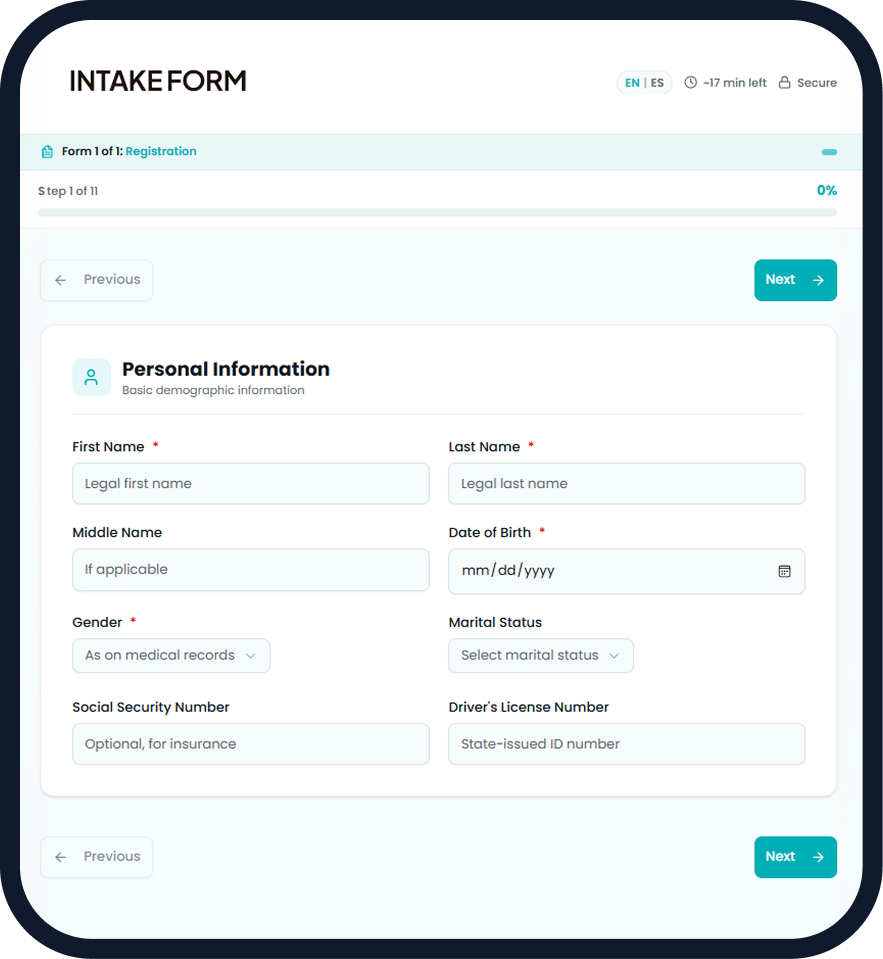
Digital intake forms sent before appointments. Patients complete everything on their phone — medical history, insurance info, consent forms, and signatures. Data syncs directly to your PMS.
Paper forms waste everyone’s time
The old way is costing you more than you think
Patients arrive early, wait longer
15+ minutes filling out forms on clipboards while your waiting room backs up
Illegible handwriting, data errors
Wrong phone numbers, missing info, and hours spent deciphering messy forms
Scanning, filing, storage
Paper forms need to be scanned, filed, and stored. Compliance risk and storage costs add up
How mConsent digitizes intake
Automatic, mobile-first, and seamlessly integrated
Mobile-First Forms
Patients get a text link (with their consent) and complete forms on their phone, typically in minutes. No app download needed.
Automatic PMS Sync
Completed forms flow directly into your practice management system. Zero manual data entry required.
E-Signatures
Legally binding electronic signatures on consent forms, HIPAA acknowledgments, and financial policies.
All the forms you need
Pre-built and fully customizable for your practice
Ready to transform your practice?
Join 5,000+ dental practices already using mConsent
Important disclosures
Completion rates, timings, and time-saved figures shown on this page are illustrative and depend on your forms, patient population, and workflow; they are not guarantees for your practice. Sending intake links by text requires patient consent under the TCPA. Plan inclusions and pricing are set in your Master Service Agreement. mConsent operates as a Business Associate under HIPAA and executes a BAA with each customer.
Figures shown on this page. The completion rate, average completion time, time saved per check-in, and paper-forms figures are illustrative of what paperless intake is designed to achieve. They are not measurements of any specific practice, are not averages across customers, and are not a guarantee or projection of your results. Actual figures vary with the length and complexity of your form packets, patient demographics and device access, how far ahead forms are sent, reminder cadence, and how your team handles exceptions at the front desk.
Completion before arrival. Whether a patient completes forms before arriving depends on factors outside mConsent's control, including whether they open the link, their device and connectivity, and how much lead time they are given. Practices should expect to keep a fallback path for patients who arrive with forms incomplete, and for those who cannot or prefer not to use a digital device.
Text delivery & TCPA. Sending intake links, reminders, or any other message by SMS requires prior express consent from the patient under the Telephone Consumer Protection Act and applicable state law, together with working opt-out handling. mConsent manages opt-in and opt-out compliance for messages sent through the platform, but your practice is responsible for obtaining consent and for its own patient-communication policies. Message and data rates may apply for recipients.
PMS sync & data entry. Form responses are designed to write back into your practice management system. Which fields sync depends on your PMS product and version, your network configuration, and how your forms are mapped. Your team should review synced information before relying on it clinically or for billing. mConsent does not verify the accuracy of information patients provide about themselves.
E-signatures & consent forms. mConsent captures electronic signatures and stores completed forms. Whether a particular form, consent, or signature satisfies your legal, clinical, or state-board requirements is a determination for your practice and its own counsel. mConsent does not draft, review, or approve the content of your forms and does not provide legal advice on consent or documentation requirements. Retention periods and record-keeping obligations remain your practice's responsibility.
Multi-language support. Translated forms are provided as a convenience. Translation accuracy is not warranted for clinical or legal sufficiency, and your practice remains responsible for ensuring patients understand what they are signing and for meeting any applicable language-access obligations.
HIPAA. mConsent operates as a Business Associate under HIPAA and executes a Business Associate Agreement (BAA) with each customer, maintaining administrative, physical, and technical safeguards. Your practice remains the Covered Entity and is responsible for lawful use of the platform and for obtaining any patient consents required by law. View our security practices
Product claims & Master Service Agreement. Capabilities described on this page reflect how mConsent is designed to behave in typical configurations and are not guarantees of revenue, appointment volume, staff hours saved, or any specific result. Features, plan inclusions, pricing, and availability are subject to the terms of your Master Service Agreement.
Integrations & trademarks. mConsent is designed to work with Dentrix, Eaglesoft, Open Dental, and other major PMS. Available capabilities depend on your PMS product and version, network configuration, and workflow setup. Dentrix and Dentrix Ascend are trademarks of Henry Schein One, LLC. Eaglesoft, Dolphin, and OfficeMate are trademarks of Patterson Dental Supply, Inc. Open Dental is a trademark of Open Dental Software, Inc. Third-party marks identify the systems mConsent integrates with and do not imply endorsement, affiliation, or sponsorship.